> ## Documentation Index
> Fetch the complete documentation index at: https://flow9.mintlify.site/llms.txt
> Use this file to discover all available pages before exploring further.
# Hire an AI Worker
> Pick a role, give your worker a name and avatar, and land straight in the Studio to design what it does.
Every AI Workforce starts with hiring a worker. A worker is the "who" — its
name, role, mission, and avatar — and the workflow you build in the
[Studio](/guide/workforce-studio/workflow-builder) is the "what it does."
## Hire a worker
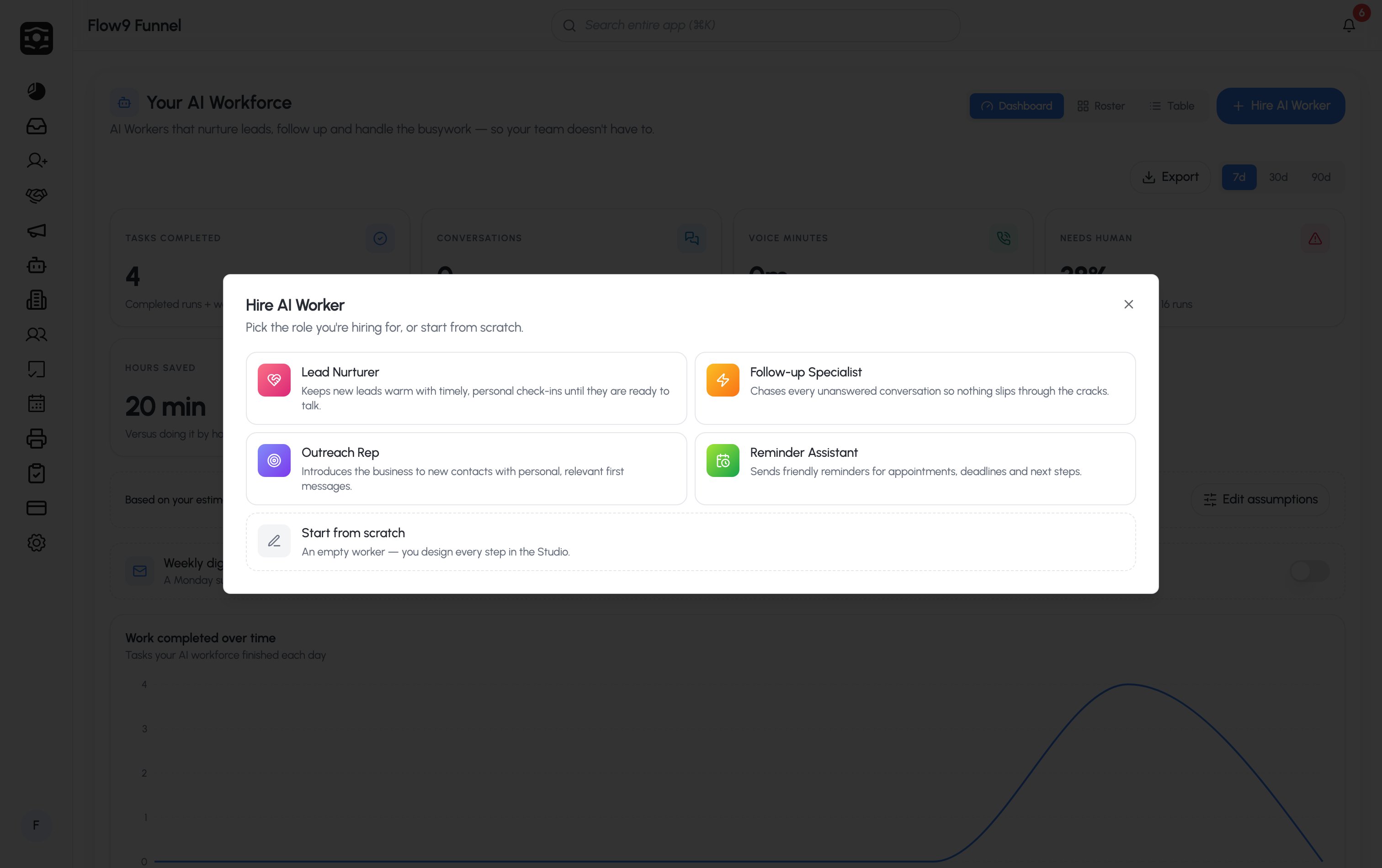
On **Your AI Workforce**, click **Hire AI Worker** (top-right). On an empty
workspace you'll see **Hire your first AI Worker** instead — same thing.
Choose a role template, or **Start from scratch** for an empty worker you
design step by step:
| Role | What they do | Default channel |
| ------------------------ | --------------------------------------------------------------------------------- | --------------- |
| **Lead Nurturer** | Keeps new leads warm with timely, personal check-ins until they're ready to talk. | SMS |
| **Follow-up Specialist** | Chases every unanswered conversation so nothing slips through the cracks. | SMS |
| **Outreach Rep** | Introduces the business to new contacts with personal, relevant first messages. | Email |
| **Reminder Assistant** | Sends friendly reminders for appointments, deadlines, and next steps. | SMS |
A role template pre-fills a starting workflow so you're not staring at a
blank canvas.
Give the worker a **name** your team will recognise (each role suggests
one — Ava, Max, Nova, Remi) and choose an **avatar**. Avatars are
illustrated marks — Spark, Bolt, Echo, Haven, Onyx, Relay, Scout, Tempo,
Chrono — never stock faces.
Click **Hire worker**. You land straight in the **Studio** with the
template's workflow ready to edit.
 ## The worker's identity
A worker carries an identity everywhere it appears — on the roster, in the
Studio, and in reports:
* **Name** — what you and your team call it.
* **Role** — a short title (e.g. "Lead Nurturer").
* **Mission** — a one-line description of what it's responsible for. Cards show
**Add a mission →** until you set one.
* **Avatar** — its illustrated mark, with a live status dot.
To change any of these later, open the worker's **⋯** menu and choose **Edit
worker**, or use **Edit worker** on the worker's profile.
## The roster
Switch to the **Roster** view to see your workers as cards. Each card shows:
* The avatar and a **live status** dot
* The worker's **name** and **role**
* Its **mission** (or the *Add a mission* prompt)
* **Runs · 7d** — how many times it has run in the last 7 days
* **Last active** — e.g. "Just now", "5m ago", "3h ago", "2d ago"
The **⋯** menu on each card offers **Edit worker**, **Open in Studio**, and
**Remove worker**.
**Remove worker** deletes the worker and its workflow. Runs already in flight
are cancelled. This can't be undone.
## The worker profile
Click a worker to open its profile, which has three tabs:
## The worker's identity
A worker carries an identity everywhere it appears — on the roster, in the
Studio, and in reports:
* **Name** — what you and your team call it.
* **Role** — a short title (e.g. "Lead Nurturer").
* **Mission** — a one-line description of what it's responsible for. Cards show
**Add a mission →** until you set one.
* **Avatar** — its illustrated mark, with a live status dot.
To change any of these later, open the worker's **⋯** menu and choose **Edit
worker**, or use **Edit worker** on the worker's profile.
## The roster
Switch to the **Roster** view to see your workers as cards. Each card shows:
* The avatar and a **live status** dot
* The worker's **name** and **role**
* Its **mission** (or the *Add a mission* prompt)
* **Runs · 7d** — how many times it has run in the last 7 days
* **Last active** — e.g. "Just now", "5m ago", "3h ago", "2d ago"
The **⋯** menu on each card offers **Edit worker**, **Open in Studio**, and
**Remove worker**.
**Remove worker** deletes the worker and its workflow. Runs already in flight
are cancelled. This can't be undone.
## The worker profile
Click a worker to open its profile, which has three tabs:
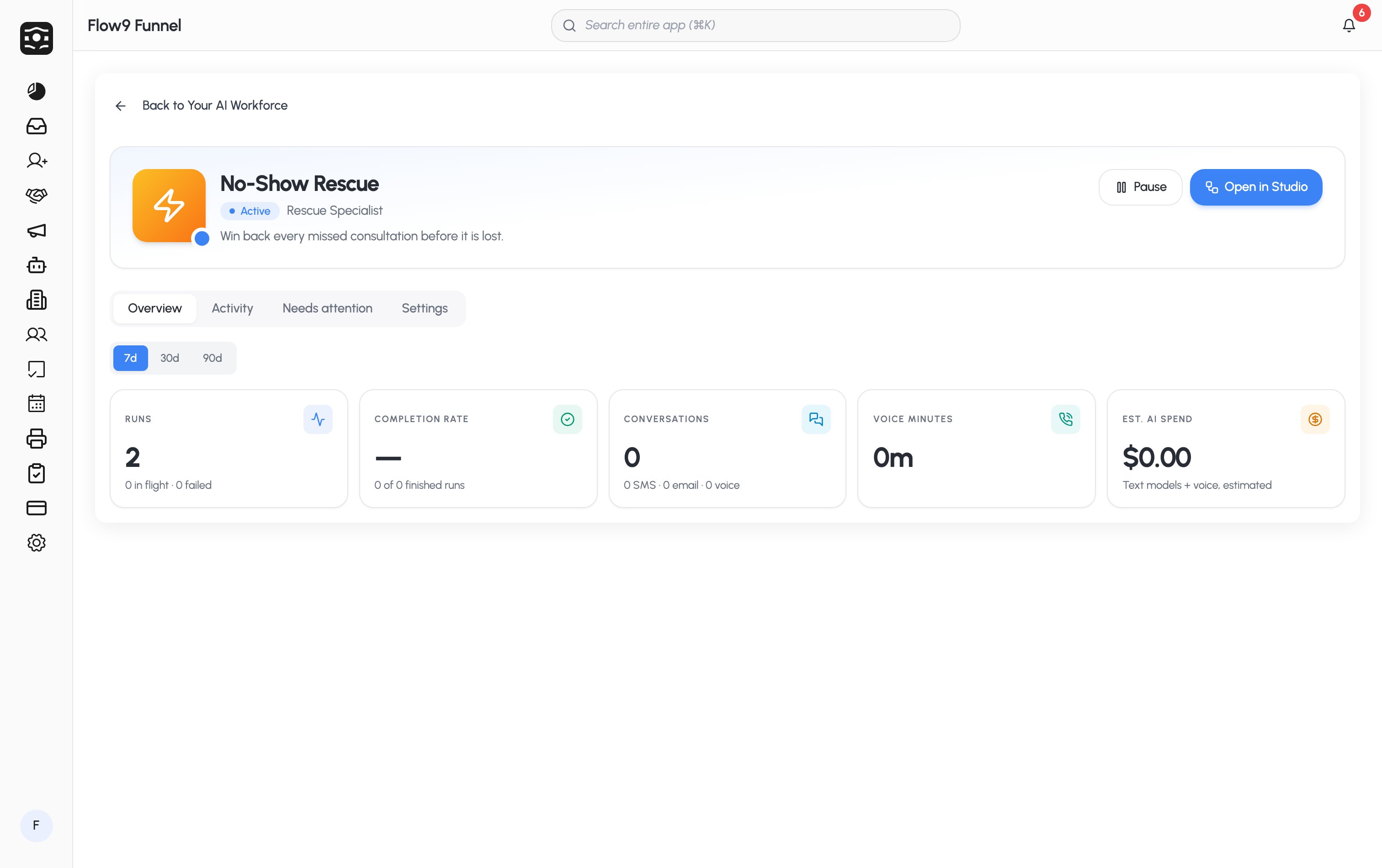 | Tab | What's there |
| ------------------- | ------------------------------------------------------------------------------------------------------------------------------------------------------------------------------ |
| **Overview** | The worker's own KPIs — runs (in flight / failed), completion rate, conversations, voice minutes, and estimated AI spend. |
| **Activity** | A feed of what the worker has been doing. |
| **Needs attention** | Failed runs, pending approvals, and escalations — with **Run again**, **Stop**, and **View record** actions. See [Approvals & escalations](/guide/workforce-studio/approvals). |
Ready to design what your worker does? Head to
[Build a workflow](/guide/workforce-studio/workflow-builder).
| Tab | What's there |
| ------------------- | ------------------------------------------------------------------------------------------------------------------------------------------------------------------------------ |
| **Overview** | The worker's own KPIs — runs (in flight / failed), completion rate, conversations, voice minutes, and estimated AI spend. |
| **Activity** | A feed of what the worker has been doing. |
| **Needs attention** | Failed runs, pending approvals, and escalations — with **Run again**, **Stop**, and **View record** actions. See [Approvals & escalations](/guide/workforce-studio/approvals). |
Ready to design what your worker does? Head to
[Build a workflow](/guide/workforce-studio/workflow-builder).