> ## Documentation Index
> Fetch the complete documentation index at: https://flow9.mintlify.site/llms.txt
> Use this file to discover all available pages before exploring further.
# ROI & usage
> See what your workforce delivered — tasks, conversations, hours saved, and AI spend — and understand how usage is metered.
The **Dashboard** view of Workforce Studio is a **Workforce ROI dashboard**: an
honest, tenant-grounded picture of what your AI Workforce actually did. It's the
default view on **Your AI Workforce**.
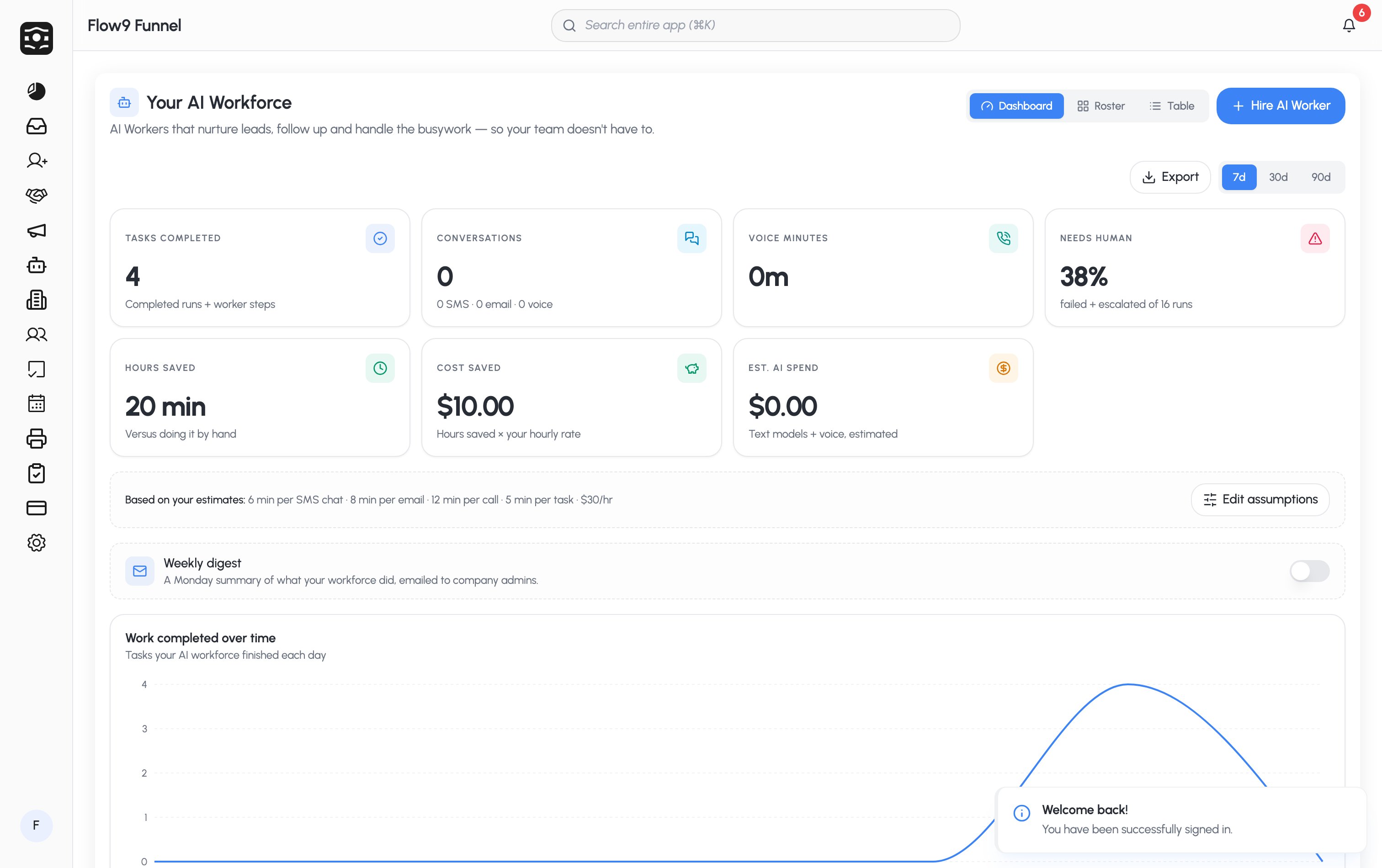 Pick a range at the top — **7d**, **30d**, or **90d** — and use **Export** to
download a report. Until your workforce has logged work in the range, you'll see
**Put your workforce to work**.
## The KPIs
| Tile | What it measures |
| ------------------- | ---------------------------------------------------------------------------------- |
| **Tasks completed** | Completed runs plus worker steps. |
| **Conversations** | Total conversations, broken down by SMS · email · voice. |
| **Voice minutes** | Total voice minutes (with voice cost). |
| **Needs human** | The share of runs that failed or escalated — deliberately shown as an honest rate. |
| **Hours saved** | Versus doing the same work by hand. |
| **Cost saved** | Hours saved × your hourly rate. |
| **AI spend** | Actual billed spend when available, otherwise an estimate (text models + voice). |
Below the tiles you'll find a **daily trend chart**, an **activity feed** (with
a per-worker filter), and a **per-worker breakdown** that reconciles with each
worker's own Overview tab.
## Assumptions — why the numbers are honest
Hours saved and cost saved are only as good as their assumptions, so Flow9
**always shows them**. The defaults are:
> 6 min per SMS chat · 8 min per email · 12 min per call · 5 min per task ·
> \$30/hr
**Admins can tune these.** Company Admins and Super Admins see **Edit
assumptions** to set the minutes-per-task and hourly rate that match your
business. The figures come from your own baselines and are always disclosed —
no inflated ROI.
## Weekly digest
Admins can switch on the **Weekly digest** — a Monday summary of what your
workforce did, emailed to company admins.
## How usage is metered
Some steps consume usage and are billed; the dashboard's **AI spend** reflects
them.
* **Metered steps** — **Send SMS**, **Call**, **Send fax**, and the **AI
Worker** step. Sending email and outbound webhooks are **not** metered.
* **AI spend** — measured in your wallet currency. When real billed spend is
available, the dashboard shows it (and compares against the estimate);
otherwise it shows the estimate.
* **Per-run usage cap** — each AI Worker can set an optional **Usage cap per
run** in its [guardrails](/guide/workforce-studio/steps-and-actions#guardrails)
to stop a run after a set spend.
Workforce usage draws on the same wallet as the rest of Flow9. See
[Billing & wallet](/admin/billing) for how top-ups and consumption work.
Pick a range at the top — **7d**, **30d**, or **90d** — and use **Export** to
download a report. Until your workforce has logged work in the range, you'll see
**Put your workforce to work**.
## The KPIs
| Tile | What it measures |
| ------------------- | ---------------------------------------------------------------------------------- |
| **Tasks completed** | Completed runs plus worker steps. |
| **Conversations** | Total conversations, broken down by SMS · email · voice. |
| **Voice minutes** | Total voice minutes (with voice cost). |
| **Needs human** | The share of runs that failed or escalated — deliberately shown as an honest rate. |
| **Hours saved** | Versus doing the same work by hand. |
| **Cost saved** | Hours saved × your hourly rate. |
| **AI spend** | Actual billed spend when available, otherwise an estimate (text models + voice). |
Below the tiles you'll find a **daily trend chart**, an **activity feed** (with
a per-worker filter), and a **per-worker breakdown** that reconciles with each
worker's own Overview tab.
## Assumptions — why the numbers are honest
Hours saved and cost saved are only as good as their assumptions, so Flow9
**always shows them**. The defaults are:
> 6 min per SMS chat · 8 min per email · 12 min per call · 5 min per task ·
> \$30/hr
**Admins can tune these.** Company Admins and Super Admins see **Edit
assumptions** to set the minutes-per-task and hourly rate that match your
business. The figures come from your own baselines and are always disclosed —
no inflated ROI.
## Weekly digest
Admins can switch on the **Weekly digest** — a Monday summary of what your
workforce did, emailed to company admins.
## How usage is metered
Some steps consume usage and are billed; the dashboard's **AI spend** reflects
them.
* **Metered steps** — **Send SMS**, **Call**, **Send fax**, and the **AI
Worker** step. Sending email and outbound webhooks are **not** metered.
* **AI spend** — measured in your wallet currency. When real billed spend is
available, the dashboard shows it (and compares against the estimate);
otherwise it shows the estimate.
* **Per-run usage cap** — each AI Worker can set an optional **Usage cap per
run** in its [guardrails](/guide/workforce-studio/steps-and-actions#guardrails)
to stop a run after a set spend.
Workforce usage draws on the same wallet as the rest of Flow9. See
[Billing & wallet](/admin/billing) for how top-ups and consumption work.