When you connect an assistant, Flow9 shows a consent screen before anything is shared. Nothing is granted until you approve it there.

The three groups

Permissions are grouped so you can decide in one go or in detail. Tick a whole group, or open it and tick individual tools. Whatever you leave unticked is not granted — the tool is not offered to the assistant at all, so it cannot be used by accident or by persuasion.
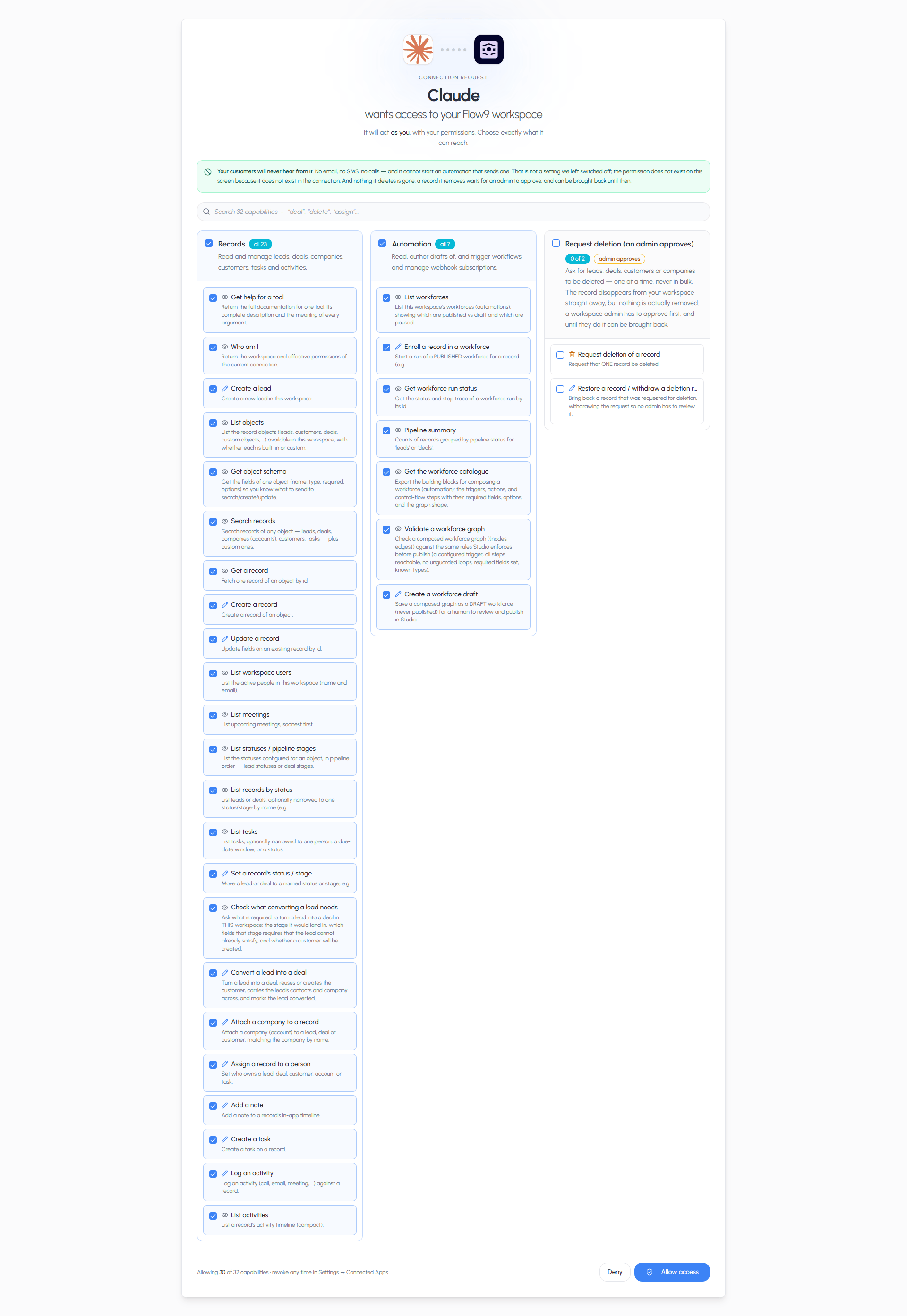
The consent screen with all three groups expanded

Read-only mode

Your workspace can allow reading but not writing. When it is set that way, the assistant can search, summarise and report, but every tool that would change a record is withheld — regardless of what you tick. This is a workspace-level decision made by an admin, not a per-user one. See Enabling AI connections.

Deletion is separate, and off by default

Deletion is not included when writes are enabled. It is a separate decision, and it is off unless your workspace has specifically asked for it. Even when it is on, the assistant cannot destroy anything. A delete becomes a request: the record is hidden, an admin reviews it, and it can be restored until they approve. See Security.

Your own permissions still apply

The assistant acts as you. It cannot see or do anything your own Flow9 login cannot. If you have no access to a module, neither does the assistant — the consent screen cannot grant you more than you already have.

Changing your mind

Go to Settings → Connected Apps in Flow9. You can see every assistant that has access and revoke any of them. Revoking is immediate. To change what an assistant may do rather than removing it, revoke it and connect again, ticking a different set.

Rate limits

To keep an assistant’s activity from crowding out the rest of your workspace, connections are capped at 30 requests a minute, 600 an hour and 3,000 a day. Chatting normally never comes close. Asking an assistant to work through hundreds of records in one go can, in which case it will slow down rather than fail — see Troubleshooting.